Table of contents
Understanding Private vs Public IP Addresses: A Beginner’s Guide
In the digital age, understanding the difference between private and public IP addresses is crucial for navigating networks safely and efficiently.

Quick Learnings:
- Private IP addresses are used within local networks and are not accessible from the internet, ensuring internal traffic remains secure, while public IP addresses are assigned by ISPs and are visible on the internet, allowing global connectivity.
- Private IP addresses are crucial for home and business networks, enabling secure communication between devices, supporting VPNs, VLANs, and enhancing internal network management.
- The key differences between private and public IP addresses include accessibility, traceability, and security, with private IPs being more secure due to their limited exposure to external threats.
Whether you’re setting up a home network or managing a corporate IT infrastructure, knowing the difference between private and public IP addresses can help you optimize performance, enhance security, and troubleshoot connectivity issues.
In this beginner’s guide, we’ll break down what private and public IP addresses are, how they function, and why they matter.
Private and Public IP: Understanding the Difference
Private IP address: definition, assignment, and ranges
A private IP address is a type of IP address assigned by a network router for use within a private network, such as a home or office LAN. These addresses are not visible to the outside world and are used exclusively for local communication between devices within the same network. This ensures that internal traffic remains isolated and secure from external networks.
The Internet Assigned Numbers Authority (IANA) has reserved certain ranges of IPv4 addresses for private use. Millions of private networks around the globe use reserved IP addresses within these ranges. The ranges designated for private IP addresses include 10.0.0.0 to 10.255.255.255, 172.16.0.0 to 172.31.255.255, and 192.168.0.0 to 192.168.255.255, each offering a distinct pool of addresses for various network configurations.

Public IP address: definition, assignment, and ranges
A public IP address is a unique identifier assigned by an Internet Service Provider (ISP) and is used to connect devices to the Internet. Unlike private IP addresses, public IP addresses are visible to everyone and serve as the primary means of identifying devices on the Internet. This allows them to communicate with websites and other online services.
Public IP addresses encompass all address ranges not reserved for private use, ensuring that each device connected to the internet has a distinct and globally unique identifier.
You can use IPXO’s What is my IP address? to find your public IP address The results also include your ISP, country, and even city.

Key Differences and Implications
Accessibility, traceability, and security implications of public and private IP addresses
Public and private IP addresses essentially serve the same purpose. Yet, they are very different in terms of accessibility, traceability, and security. Here is a short overview of the main differences between these two types of addresses:
Accessibility:
- Public IP Addresses: Accessible to everyone on the Internet.
- Private IP Addresses: Only accessible within a private network.
Traceability:
- Public IP Addresses: Can be traced back to a device’s physical location.
- Private IP Addresses: Cannot be traced back to a specific device or location outside the private network.
Security:
- Public IP Addresses: More exposed to external threats due to their visibility on the Internet.
- Private IP Addresses: Less vulnerable to threats due to being used within a private network and not directly accessible from the Internet.
Because this kind of visibility can make it easier for companies to connect your identity to your location, some people choose tools like Incogni help reduce their exposure. It works in the background by contacting data brokers and requesting the removal of your personal information, so you don’t have to chase them down yourself.
Common Use Cases for Private IP Addresses
Private IP addresses are essential in various scenarios, serving critical roles in home networks, business networks, and virtual networks.
In home networks and local area networks (LANs), private IP addresses are used to connect multiple devices such as computers, smartphones, printers, and smart home devices, allowing them to communicate and share resources like internet connection and files.
In business environments, private IP addresses are deployed within local and wide area networks (WANs) to enable seamless connectivity and collaboration among employees, enhancing productivity and data security. Additionally, private IP addresses are crucial in setting up virtual private networks (VPNs) and virtual local area networks (VLANs). VPNs use private IP addresses to create secure, encrypted connections over the internet, allowing remote workers to access company resources safely. VLANs, on the other hand, utilize private IP addresses to segment larger networks into smaller, isolated sub-networks, improving network management and security.

Companies like Facebook and IPXO rely heavily on the strategic use of private IP addresses to maintain efficient, secure, and scalable network infrastructures that support their vast and dynamic operations.

Your IP Insights
Access detailed information on your IP address and browser in seconds. View detailed IP information, including city, country, ASN, and more.
Checking Your IP Address
As we discussed already, to check your public address, you can use IPXO’s What is my IP address?. For more in-depth insights, like RPKI, BGP routing details, geolocation, and WHOIS records, try our IP Data Intelligence.
To check private IP addresses, you need to access network properties via your device. Here is how to find your private IP address on Windows 10.
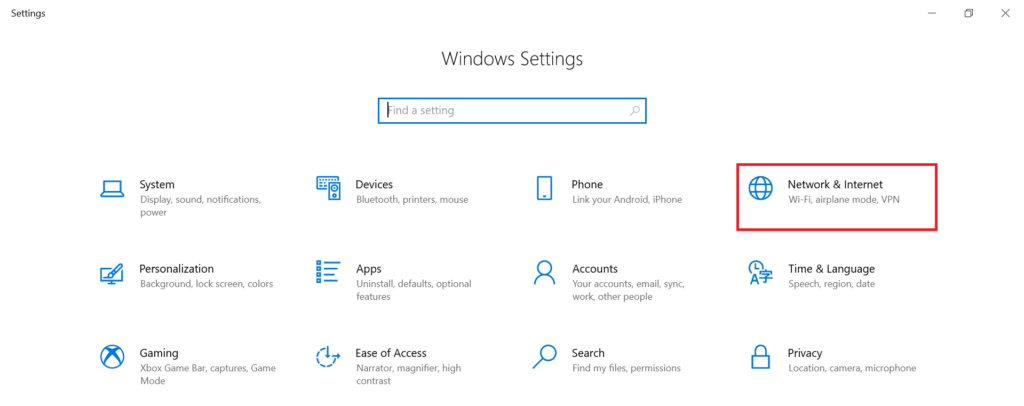
1. Go to Settings and click Network and Internet.
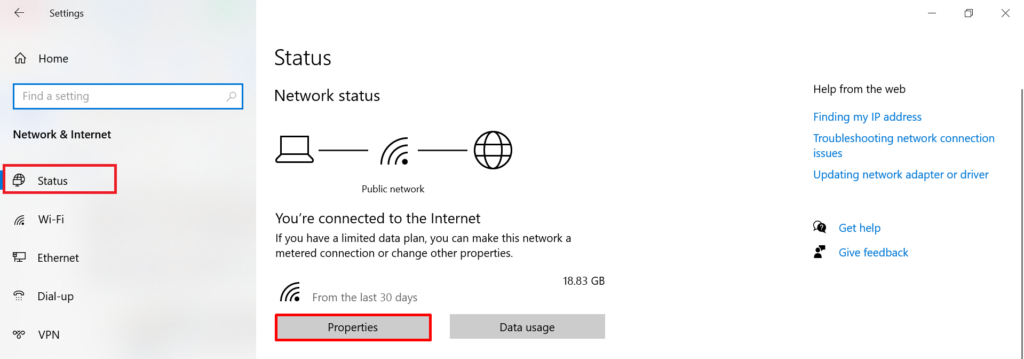
2. Select Status on the left and click Properties.
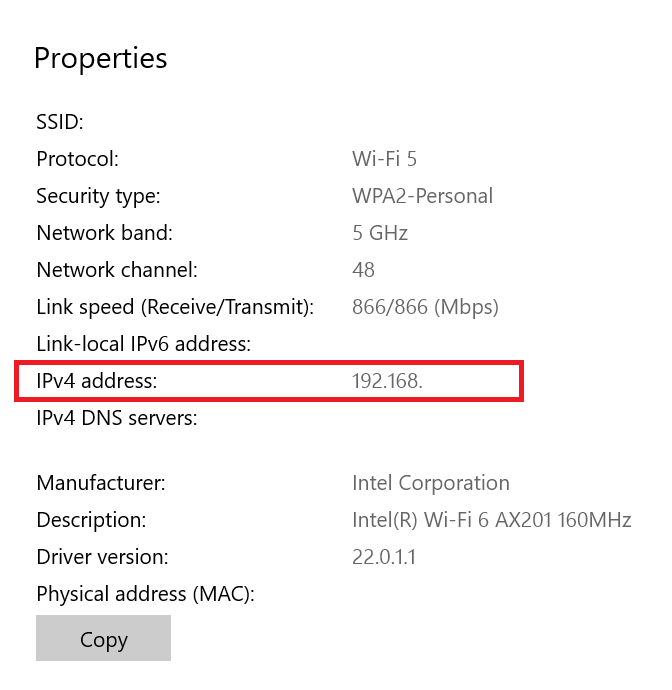
3. Scroll down to Properties to find your private IP address on the right of the IPv4 address.
It is just as easy to find your private IP address on Mac, iOS, and Android devices.
This example demonstrates how to find the IPv4 address, but remember that IPv6 addresses exist too. If you wish to learn more, we have discussed in great detail the differences between IPv4 and IPv6 in a comprehensive guide. Although the latter should have replaced the former, IPv6 adoption has been slower than anticipated.
Conclusion
Understanding the distinction between private and public IP addresses is fundamental for anyone involved in managing networks, whether at home or in a corporate setting. Private IP addresses play a critical role in ensuring secure and efficient local communication, while public IP addresses enable devices to connect and interact over the internet.
Recognizing the differences in accessibility, traceability, and security implications helps in optimizing network performance and protecting against external threats. By utilizing private IP addresses in home networks, business infrastructures, and virtual environments, organizations can enhance internal communication and safeguard their digital assets. Meanwhile, knowing how to check and manage your IP addresses, both private and public, equips you with the knowledge to maintain a secure and functional network.
FAQ
A private IP address is used within a private network and is not visible to the outside world, whereas a public IP address is assigned by an ISP and is used to connect devices to the internet, making them visible globally.
About the author

Ignas Anfalovas
Platform Engineering Manager
Related reading

Static vs Rotating IPs: Which Strategy Wins for Automation and Data Collection?
Guest post by IPRoyal Data collection requires a clear, well-thought-out plan, and you’ll need reliable tools to gather information successfully from modern websites. Choosing the…
Read more
What’s Happening to the Global IPv4 Address Pool Today?
The global IPv4 address pool is no longer expanding, yet internet infrastructure continues to grow. Understanding how address distribution, routing behavior, and resource management evolve after IPv4 exhaustion is…
Read more
IP Fragmentation: The Invisible Problem Costing Operators Millions
IPv4 fragmentation builds slowly as networks evolve, leaving organizations with scattered address space, reduced visibility, and growing operational complexity.
Read more
Subscribe to the IPXO email and don’t miss any news!