Table of contents
Understanding IP addresses: a complete guide to Internet Protocol
Every device connected to an IP network uses an IP address - a unique numerical identifier that enables communication over the internet or private networks. From websites and cloud servers to smartphones and laptops, IP addresses make it possible to send and receive data. In this guide, you'll learn what IP addresses are, how they work, the different types available, how they're assigned, and the security and privacy considerations associated with them.

An IP address is a unique numerical identifier assigned to a device connected to a network. It allows devices to communicate, exchange data, and identify one another over the internet or private networks. IP addresses can be public or private, static or dynamic, and use either Internet Protocol version 4 (IPv4) or Internet Protocol version 6 (IPv6).
IP stands for Internet Protocol, a set of rules that facilitate data communication between networks. Each internet-connected network or device within a network needs an Internet Protocol address to send and receive data.
The format of an IP address is a set of numbers separated by dots or colons. For example, 17.172.224.47 (Internet Protocol version 4) or 1301:7db8:86a3:3010:0000:8a4e:0474:7104 (Internet Protocol version 6). The number and range of these values separated by punctuation depend on the type/version of the IP address.
IP addresses are allocated by the Internet Assigned Numbers Authority (IANA), a subsidiary of the Internet Corporation for Assigned Names and Numbers (ICANN), a nonprofit organization based in the US.
IANA doesn’t assign IP addresses directly to organizations, institutions, and internet service providers. Instead, it allocates them in large blocks, otherwise called subnets. These large subnets can be divided into smaller ones and then allocated or assigned according to regional policies.
Key takeaways:
- An IP address is a unique identifier that enables devices to communicate across networks using the Internet Protocol.
- IPv4 and IPv6 are the two versions of the Internet Protocol, with IPv6 designed to address IPv4 address exhaustion.
- IP addresses can be public or private, as well as static or dynamic, depending on how they are assigned and used.
- Businesses use IP addresses to connect websites, servers, networks, cloud infrastructure, and internet-connected devices.
- As IPv4 address space remains limited, organizations increasingly rely on transfers and leasing to acquire additional IPv4 resources.
How do IP addresses really work?
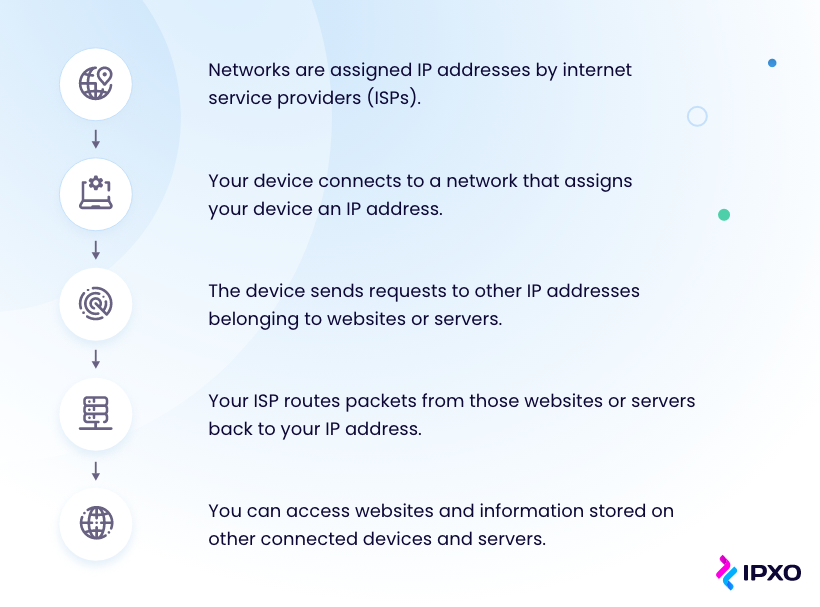
Information transmitted over the internet is divided into discrete blocks, called packets, which contain the data being exchanged between devices.
Like a postal address on a physical parcel, an IP address identifies the destination of each packet so that routers can deliver it to the correct device across a network.
The process of assigning and using an IP address generally looks like this:
IP address types
Since IP addresses are so fundamental to the internet, it will come as no surprise that they break down into different types depending on their purpose and the needs of their assignee.
Types of IP addresses you’ll hear referred to include:
- Static
- Dynamic
- Public
- Private
- Dedicated
- Shared
- IPv4
- IPv6
These types fall into separate sub-categories, each representing a different feature or function of IP addresses.
Public vs. Private IP addresses
Any Wi-Fi network in your home or at your office will have both public and private IP addresses. Whether in a private home or part of a company network, these are consumer IP addresses.
Private IP address
Any given Wi-Fi network can have many connected devices, including computers, smartphones, printers, or speaker systems. With the continued growth of the Internet of Things (IoT), homes and businesses now commonly include multiple internet-connected devices, like smart appliances and security systems.
To allow the network router to differentiate each device connected to the network, a unique IP address is assigned to every single one of them. Since these specific IP addresses are relevant to their network, they are called private IP addresses.
Public IP address
While all devices on the same network have private IP addresses, the network itself (more specifically, the router) has its own public IP address. This is the address that identifies the network on the internet.
The public IP address is assigned by an Internet Service Provider (ISP), which allocates addresses from its available pool of IP resources.
Public IP addresses are the destination IP addresses for data sent to a network. The router then uses its private IP addresses to ensure the data gets to the right device.
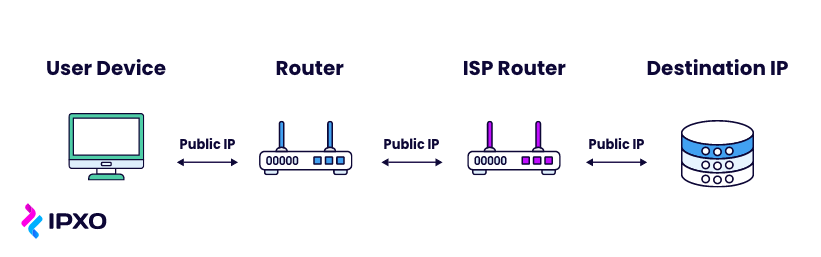
If you want to see what public IP address your network is currently using, you can use an IP checker. For example, the Outbyte IP checker displays the public IP address your network uses to connect to the internet.
Static vs. Dynamic IP addresses
Public IP addresses can be either static or dynamic. As the names suggest, a static IP address remains the same, while a dynamic one may change periodically. Let’s dive into the why.
Dynamic IP addresses
If a network is assigned a dynamic IP address, its specific IP address will regularly change. The ISP handles this automatically. It assigns you a new IP address and returns your old one to its pool.
The vast majority of networks, especially home networks, don’t need to use the same IP address for long, and using dynamic IP addresses doesn’t affect overall network performance.
Assigning IP addresses dynamically saves internet service providers money, theoretically making the average home IP address more affordable.
For example, an ISP serving a residential community employs dynamic IP address assignment through Dynamic Host Configuration Protocol (DHCP). This protocol allocates IP addresses to devices automatically, only when they connect to the network, reducing manual administrative work. As a result, the ISP saves money by efficiently managing its IP address resources while adapting to changing network demands.
A dynamic IP also makes it harder for cybercriminals to access your network interface or track your internet activity.
Static IP addresses
In some instances, however, a network will need its own IP address that always stays the same. It is called a static IP address.
Static IP addresses primarily used by businesses that host websites, VPNs, or other internet-facing services. The websites and email addresses associated with such servers need their own, consistent digital addresses to ensure they’re always discoverable online.
For example, a company obtains a static IP from its ISP to host their website. This fixed address ensures reliable access to their site, which is crucial for businesses that rely on their online presence for customer engagement.
Because a static IP address remains unchanged, it can be more prone to cyber threats. Organizations using static IPs should implement security measures, such as firewalls, access controls, and regular monitoring.

Your IP Insights
Access detailed information on your IP address and browser in seconds. View detailed IP information, including city, country, ASN, and more.
Dedicated vs. Shared IP addresses
When hosting websites or internet-facing services, hosting providers typically offer either dedicated or shared IP addresses. The right choice depends on your hosting requirements and security needs.
Dedicated IP address
Some individuals and organizations choose to purchase hosting plans with a dedicated IP address. This means their website is assigned a unique IP address that isn’t shared with other customers.
A dedicated IP address can be beneficial for running a File Transfer Protocol (FTP) server. Although modern SSL certificates work on both dedicated and shared IP addresses, some organizations still prefer a unique IP for operational or compatibility reasons. However, this type of hosting typically costs more than shared hosting.
Shared IP address
For most websites with a reasonable number of pages and amount of traffic, a shared IP address is all they need. In this setup, multiple websites are hosted on the same server and share a single public IP address.
Shared hosting generally offers lower costs and is suitable for most small- to medium-sized business websites.
IPv4 and IPv6
Today, there are two main versions of IP addresses in use – IPv4 and IPv6. Even though IPv4 still remains the dominant internet protocol in 2026, IPv6 adoption continues to grow worldwide.
IPv4
IPv4 was introduced in 1981 and has been the leading format ever since.
It consists of four decimal numbers ranging from 0 to 255, separated by dots. An IPv4 address might look something like this:
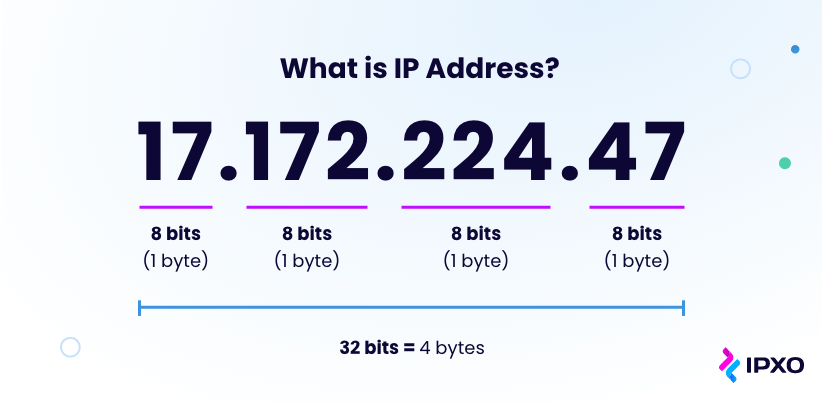
This format supports approximately 4.3 billion unique IP addresses, which was considered more than enough before the expansion of the internet. However, in the early days of the internet, organizations were allocated more IP addresses than they needed. Combined with the rapid growth of internet-connected devices, this eventually led to IPv4 address exhaustion.
IPv6
As the number of computers and other connected devices trying to connect to the internet has continued to grow, it became clear that IPv4 alone could no longer provide enough addresses to meet global demand.
To give every connected device access to the World Wide Web, a much larger address space was needed. That’s why IPv6 was developed. (Wondering what happened to IPv5?)
IPv6 addresses consist of eight groups of four hexadecimal characters separated by colons to create new combinations for IP addresses. An IPv6 address might look something like this:

Using this format, IPv6 supports approximately 240 undecillion unique IP addresses. This is, in theory, more than we’ll ever need.
Common security threats and how to protect your IP address
Although an IP address is essential for internet communication, it can expose certain information about your network. While it alone doesn’t give someone full access to your devices, it can be used in attacks or reveal limited information, such as your approximate location. Here are a few common risks.
IP address security threats
Tracking your location
As well as being a kind of digital address that helps communicate data, your IP address can also reveal your approximate geographic location via the public internet.
Geolocation tools like My Location can associate your IP address with a specific region, state or city. With the right skills and know-how, hackers might be able to track down your geolocation too.
Attacking your network
It’s no secret that any computer network is susceptible to a cyberattack. It’s easy for a hacker who knows your IP address to flood your network with access requests.
They use multiple devices to send simultaneous requests to your IP for data, making it seem as if multiple people are trying to contact your network at the same time.
Distributed denial of service (DDoS) attacks can temporarily shut down your internet access.
Using your IP for illegal downloads
In the wrong hands, your IP address can land you in a situation where you could become the victim of identity theft.
Some attackers attempt to conceal their identity by routing internet traffic through compromised devices or unsecured networks. If malicious activity appears to originate from your public IP address, it could draw unwanted attention from internet service providers or law enforcement during an investigation.
Hacking your device
While uncommon, it is possible for hackers who know your IP address to gain access to your personal devices.
By exploiting the ports associated with your IP address, a bad actor may be able to force a connection and steal personal information from your smartphone or other devices. They may even install malware on your device that could compromise your security long-term.
IP address protection
Fortunately, there are several practical steps you can take to protect your IP address, reduce your online exposure, and improve your overall network security.
Use a proxy server
One solution to hiding your IP address and activity online is to make use of a proxy server.
A proxy server is an online service that routes information through an intermediary server between your device and the internet.
This means that when you visit other websites, the servers hosting those websites will only see the proxy server’s IP and not your own. When information is sent back to you, it is routed via the proxy server.
The effectiveness of a proxy depends on the provider. Unreputable proxy servers exist, and they may track your activity and put your private network at risk. Trusted providers like NodeMaven offer residential proxies with clean IP pools, abuse monitoring, and transparent sourcing, reducing the risks associated with low-quality proxy services
Use a VPN
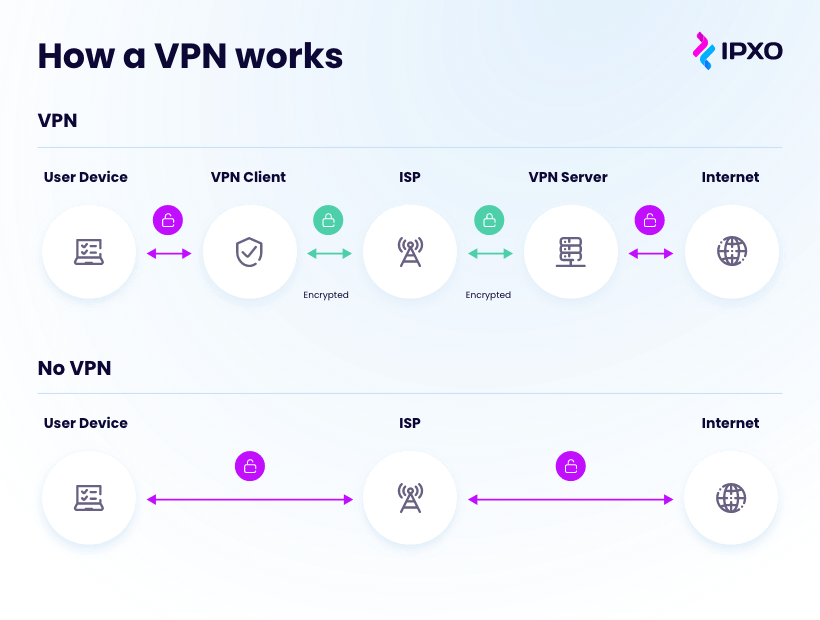
Connecting computers or mobile devices to a Virtual Private Network (VPN) makes it appear as if your device and the VPN are on the same local network, even if you’re accessing it from halfway around the world.
Instead of sending information directly to and from your device’s actual network, data is sent via a secure connection to and from the VPN.
As well as the IP and data security benefits, VPN also offers extra encryption when using public Wi-Fi and allows you to change the location you appear to be accessing the internet from.
When to use a VPN
- When you need privacy. Each time you visit a website, it logs your IP address and attaches cookies. Using a VPN when surfing the web keeps you safer and your data more private.
- On public Wi-Fi. Hackers on the same Wi-Fi network as you may have access to your personal information. A VPN encrypts all data you send over an unsecured Wi-Fi network.
- When working remotely. Being able to connect to company servers remotely offers you and your colleagues security while accessing internal resources.
- When you need to access geo-targeted content. Some websites are blocked in certain countries. Furthermore, online services like Netflix offer different content depending on where you are.
The future of IP addresses
By now, you should have a clearer understanding of what IP addresses are, how they work, and why they remain essential to internet communication.
IP addresses are part of a shifting internet landscape, and looking into the future of how we use the internet also means looking at how we organize IP addresses.
Whether it’s solving the problem of the IPv4 shortage, shifting to IPv6 or embracing change while ensuring the sustainability of the internet, IP addresses are and will remain a big part of the future of the internet.
IPv4 as the future of IP addresses
Although IPv4 address space is limited, today’s challenge is less about the total number of addresses and more about how they are distributed and utilized.
When IANA first allocated IP addresses starting in the early days of the internet, it over-allocated addresses to some organizations and institutions. As a result, while unallocated IPv4 address space has been exhausted, many allocated addresses remain underutilized and continue to circulate through the secondary market.
Much of today’s internet infrastructure continues to rely on IPv4, and many networks, applications, and cloud services still require IPv4 connectivity. As a result, organizations continue to acquire IPv4 resources through transfers and leasing while planning their long-term IPv6 adoption strategies.
IPv6 as the future of IP addresses
IPv6 was created in 1995 to overcome IPv4’s address limitations by providing a much larger address space. As mentioned previously, IPv6’s plentiful variations mean it can solve any scarcity problems surrounding IPv4.
Despite its advantages, many organizations still rely heavily on IPv4 for a pretty simple reason.
Transitioning to IPv6 requires investment in new hardware, software, training, and infrastructure upgrades. Organizations must allocate resources and budget effectively to facilitate a smooth transition without disrupting operations.
It’s a common agreement that IPv6 has a vital role in the future development of the internet. While it may not be fully integrated into the existing systems, it is likely to be used to build new infrastructures from the ground up. Even though IPv6 adoption has been slow, it is evident it will not stop.

Internet and IP address sustainability
The continued growth of the internet depends on the efficient management of IP address resources. While IPv6 adoption continues to expand, IPv4 remains essential for many networks, applications, and internet services. Making better use of existing IPv4 resources helps organizations meet current demand while supporting a gradual transition to IPv6.
IPXO embraces and promotes the sustainability of the internet, and we’ve set our sights on ensuring that the IP needs of the world can be met with convenience.
Rather than viewing IPv4 exhaustion solely as a need to replace existing infrastructure, we see an opportunity to improve the utilization of the address space already allocated. Many organizations hold IPv4 resources that are underutilized and no longer required for their operations.
IPXO offers a way to monetize unused IP resources and provides a simple solution for those who need IP addresses. Not only do we help alleviate the IPv4 shortage problem, but we also put accessibility and innovation at your fingertips.
Whether you’re looking to lease IPv4 resources or generate revenue from unused address space, we invite you to explore our fully automated IP marketplace and discover how our services can work for you.
FAQ about IP addresses
An IP address is a unique numerical identifier assigned to devices connected to a network. It enables devices to identify one another and exchange data using the Internet Protocol.
About the author

Ignas Anfalovas
Platform Engineering Manager
Related reading

Why IPv6 didn’t eliminate the need for IP context
IPv6 is widely recognized as the solution to address exhaustion, expanding the available address space and allowing the Internet to scale beyond the limits of…
Read more
Static vs rotating IPs: which strategy wins for automation and data collection?
Guest post by IPRoyal Data collection requires a clear, well-thought-out plan, and you’ll need a reliable web scraping API to gather information successfully from modern…
Read more
What’s happening to the global IPv4 address pool today?
The global IPv4 address pool is no longer expanding, yet internet infrastructure continues to grow. Understanding how address distribution, routing behavior, and resource management evolve after IPv4 exhaustion is…
Read more